The Route Assistant tab
Last verified
The Route Assistant tab is where you plan by conversation. Type what you want ("3 days from Annecy, about 60 km a day, quiet roads") and Mec, the AI route partner, asks anything it needs, then builds and edits the route on the map beside you. It's the first tab in the left rail, and it needs a free account.
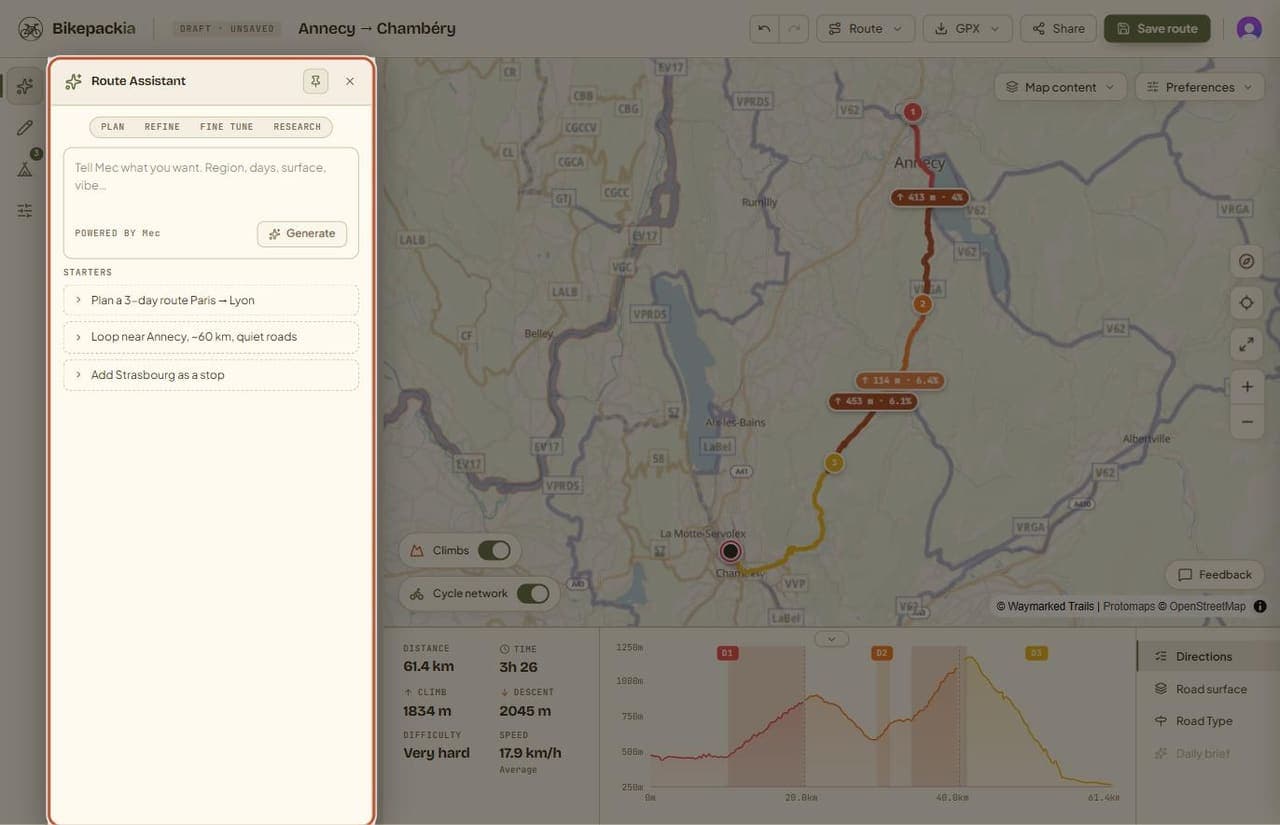
What's in the panel
- The message box: describe the trip, or ask for a change to the route you already have.
- Starters: example requests you can open and use as a starting point. On a saved route that already has chats, this list is replaced by Chat history (see below).
- New chat: once a chat is open, this link at the top right of the panel clears it and takes you back to an empty message box.
- The mode pills (Plan, Refine, Fine Tune, Research): these show which mode Mec is working in on the current turn. They're an indicator, not a switch — Mec picks the mode itself as the conversation moves on.
- Tappable replies: when Mec asks a question it offers short answers you can tap instead of typing.
What Mec does here
- Builds a first route from your description, asking about the region, the number of days or anything else it's missing.
- Offers route options when there's more than one sensible way (see below).
- Changes the route you already have: shorten a day, move where a day ends, route via a town, swap the bike type.
- Finds places (water, food, groceries, repairs, sights, places to stay) near a point of the route and pins them on the map.
- Answers questions about the route, such as how much climbing day 2 has.
- Remembers preferences you state, either for every trip or just this one.
Everything Mec does here lands on the same route as your own edits, so you can switch between the tabs freely, and undo works the same way for both.
Asking for a brand-new trip while a route is on the map ("now a 120 km gravel ride from Bordeaux to Arcachon") starts a new route: Mec clears the old one, with its stops and days, and plans the new trip from scratch rather than moving the old route's start and end. Clearing it is an ordinary step, so undo can take you back to the old route.
Working out a route can take 10 to 20 seconds; Gravel and MTB routes take the longest. The routing server gives up after about 25 seconds: if no route is ready by then, it counts as busy and you can try again. While it runs, the 'Calculating route…' pill at the bottom of the map shows it's still working (see the map and stats bar page).
Route options
- When Mec offers options, each is drawn on the map and gets a card with its distance, climbing, days and a surface line such as '24% unpaved · 60% paved · 16% unknown'. 'Unknown' is the part with no surface recorded in the map data; it is never counted as unpaved. A route with no surface data says 'Surface unknown'.
- Each card also has a per-day line: the number of days and the average distance, climbing and ride time per day, like '~5 h 30'. The ride time uses the same estimate as Time in the stats bar, so the two agree once you use that route.
- The option's name and description are written before the route is calculated, so they describe the way it goes rather than promising figures; the numbers on the card are measured from the routed line. If a description's distance turns out well off the routed one, Mec says so and gives the routed distance. If an option can't be built at all, Mec tells you instead of describing it.
- Use this route commits the option you picked and splits it into days. The pick sends no message to Mec and costs no credit.
- The chat then shows 'Route set — 3 days' (with that route's day count) and suggestions such as 'Find sleep, lunch & water' and 'Check the days'. Tapping a suggestion is an ordinary message, so it spends credit like any other reply.
- Mec learns which option you picked with your next message.
Chats and saved routes
On a saved route, a chat joins the route's Chat history on its own when you're done with it: when you close or leave the page, start a New chat, or pick another chat from the list. Saving the route (Save route or Update in the top bar, or asking Mec to save it) adds it too. Chatting doesn't count as an unsaved change, so the top bar's status tag doesn't move.
On a route you haven't saved yet, the chat only joins the route when you save it. If you've chatted with Mec and try to close or leave the page without saving, the browser asks first, even if there's no route on the map yet. Leave anyway and the chat won't appear anywhere.
Opening a saved route starts with an empty chat. If the route has earlier chats, Chat history takes the place of the starters: a scrollable list of chat titles, each with its date. Click one to bring back that conversation's messages, then carry on where you left off. The text comes back; interactive cards from the original chat, such as route-option pickers, don't. New chat takes you back to the list.
When you carry on with an earlier chat, Mec works from a short summary of it, plus the last few exchanges, rather than rereading the whole conversation. You still see every message. Mec doesn't greet a reopened route with a recap of the last chat; to continue one, pick it from Chat history. Each chat gets a short title written automatically when it joins the route (when you save, or when you finish a chat on a saved route), as long as it has new messages since its last title. The summary is written only when you reopen a chat and send your first message, so that one reply can take a moment longer to start; the title is refreshed at the same time. Neither costs you credit.
Account and credits
The Route Assistant needs a free account, and each reply spends credits; picking a route option doesn't. New accounts start with €2 of credit. The rest of the planner (the map, Trip points, Stages, GPX export) works without an account and doesn't use credit.
Frequently asked questions
Why is the Route Assistant locked?
You need to be signed in to use it. Sign in with a free account and you get €2 of credit to start.
Can I choose whether Mec plans or refines?
No, and you don't need to. The pills across the top show which mode Mec chose for the current turn; it switches modes itself as the conversation moves from a first plan to fine detail.
Where are my earlier chats about a route?
Open the saved route and go to the Route Assistant tab: they're listed under Chat history, newest first. A chat on a saved route shows up there once you finish it or save the route; a chat on a route you never saved doesn't appear.
Does Mec remember what we discussed last time?
When you reopen a chat from Chat history, yes: Mec gets a summary of the earlier conversation plus the last few exchanges. A new chat on the same route starts fresh, apart from the route itself and your saved preferences.
Does Mec draw the route itself?
No. Mec works out what you want and asks the routing engine for it, so every line follows real roads and tracks from OpenStreetMap.
Does picking one of Mec's route options cost credit?
No. Use this route commits the option on your side without sending a message. Only the messages you send, including a tapped suggestion, spend credit.