The Trip points tab
Last verified
The Trip points tab is where you build a route by hand. Set a start and a destination, add waypoints in between, and choose the bike profile the route is computed for. It's the second tab in the left rail and works without an account.
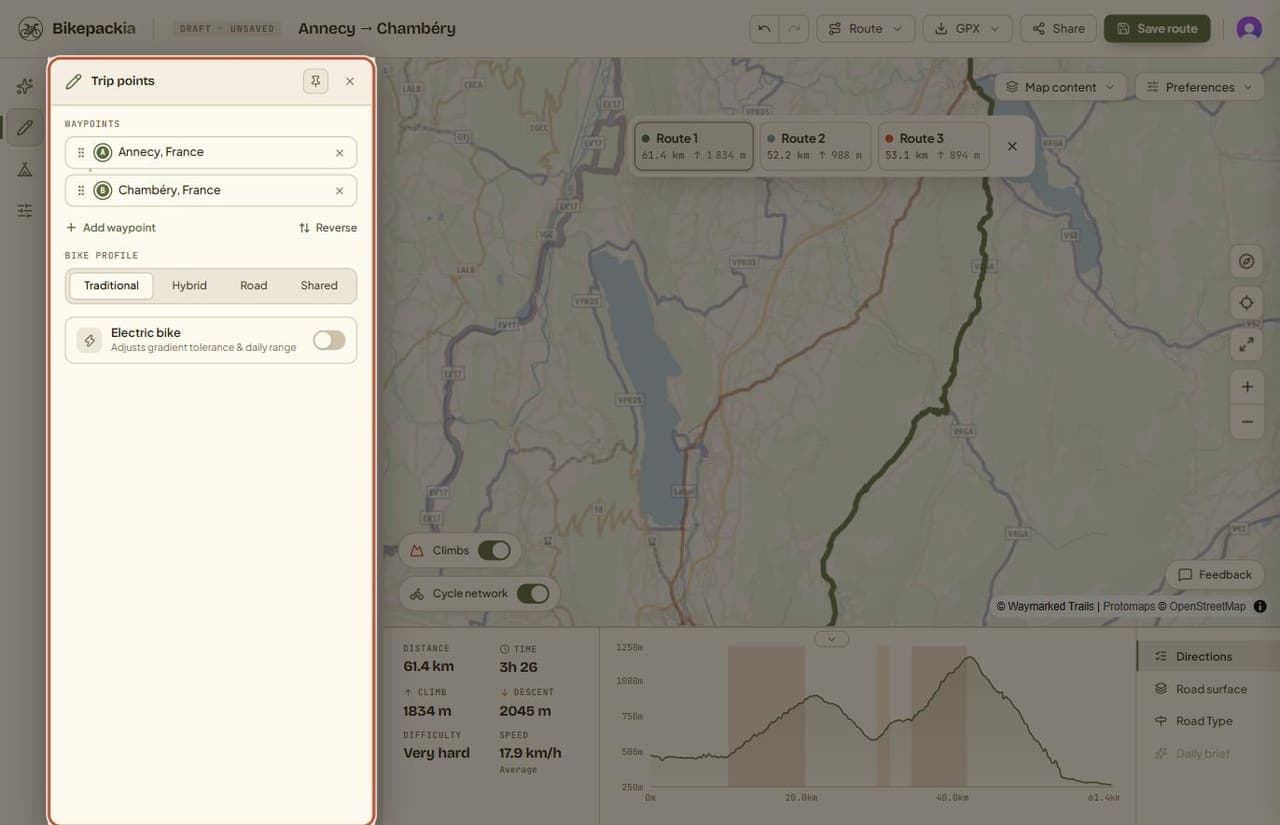
Setting the points
- Type a place name into the start or destination field and pick from the suggestions.
- Or click the map to set the start, and right-click it to set the destination.
- Add waypoint puts another point in between, to force the route through a place.
- Drag the handle on a point to reorder it; the × removes it.
- Reverse flips the whole trip, so you ride it the other way round.
The route recomputes as soon as the points change, and the distance, climbing and elevation profile at the bottom of the screen update with it. Most routes take a few seconds; Gravel and MTB routes can take up to about 20, and a 'Calculating route…' pill on the map shows it's still working.
Bike profile
| Setting | What it means |
|---|---|
| Traditional | The everyday cycling profile. |
| Gravel, MTB | For a gravel bike or a mountain bike. Routes are computed on Bikepackia's own routing server with a dedicated gravel or mountain-bike profile that leans towards tracks and unpaved roads. Very long routes, or one that server can't finish in time, use a general mountain-bike cycling profile instead. Neither guarantees a share of gravel: check Road surface, where any stretch with no surface recorded shows as Unknown surface. |
| Road | Favours sealed roads suited to a road bike. |
| Electric bike | A separate switch. It sets the daily range used when the trip is split into days and, for Traditional and Road, switches the route to an e-bike profile. Gravel and MTB routes from Bikepackia's own server keep their gravel or mountain-bike line with the switch on. |
Once the route is split into days, the points are grouped by day. Each day's card is headed DAY 1, DAY 2 and so on with the day's distance and ride time (the same share of the trip's Time as in the Stages tab), and has an 'Add stop in day 1' (2, 3…) link. Before the route has been calculated, the card shows the distance only.
When a route has more than one sensible option, the planner offers alternatives above the map (Route 1, Route 2, Route 3) with each one's distance and climbing, so you can compare before choosing.
Frequently asked questions
How do I make the route go through a particular town?
Add it as a waypoint in the Trip points tab, between your start and destination. The route is then computed through it.
Do I need an account to build a route by hand?
No. Trip points, the map, stages and GPX export all work signed out. Saving the route is what needs an account.