Planning with Mec in the app
Last verified
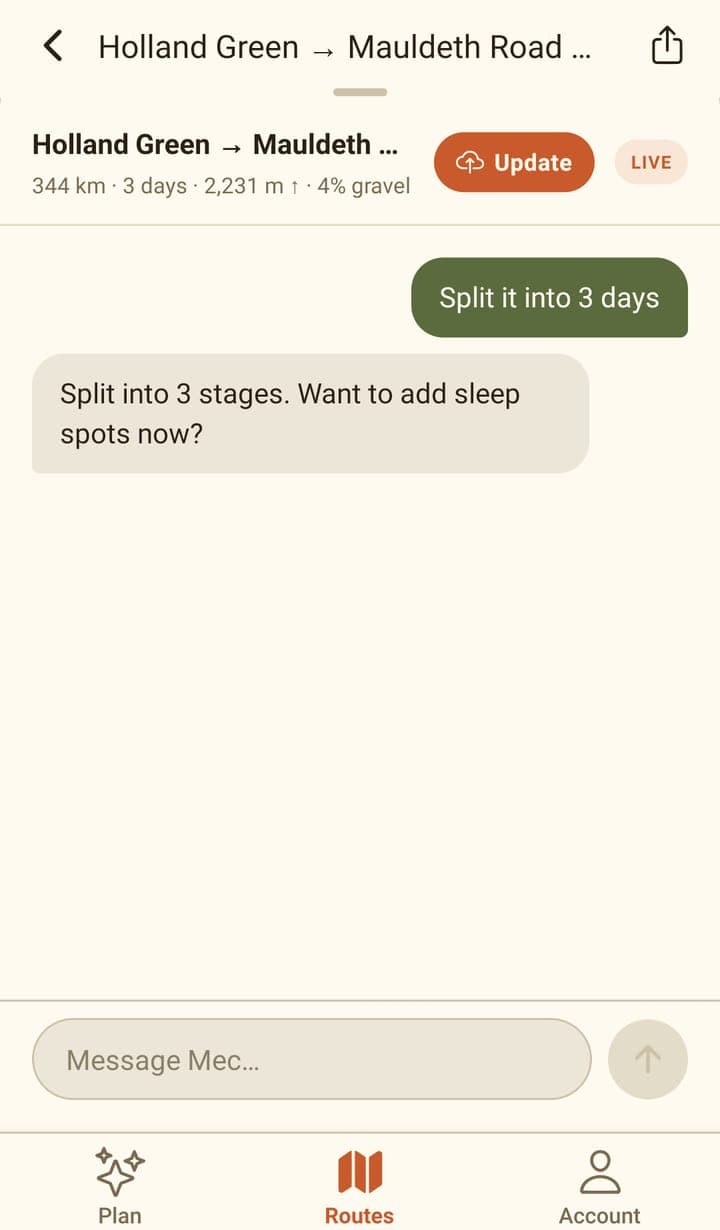
Mec, Bikepackia's AI route partner, reworks the route when you tell it what changed: "make today shorter", "the pass is closed", "find me a bed near here". It offers lettered route options to compare on the map, and places to sleep or refill as pins you can swipe through. A band at the top shows the live route's distance, days, climbing and surface, with a Save button — the route isn't saved until you press it.
What you can ask for
- A whole trip: "Plan a 3-day route Paris → Lyon".
- A change mid-trip: "make today shorter", "the pass is closed, route me round it", "add Strasbourg as a stop".
- A split: "split it into 3 days".
- Stops: "find a place to sleep near the end of day 1", or water and lunch stops for a day.
- A standing preference: "I always avoid city centres" is saved to your profile; "skip cities on this one" applies to this trip only.
- A save: "save this as Loire spring tour".
Asking for a brand-new trip while a route is open — "now a 120 km gravel ride from Bordeaux to Arcachon" — starts a new route: Mec clears the old one, its stops and its days, and plans the new trip from scratch rather than stretching the old route to fit. On a saved route, saving the new trip then saves it as a new route; the one you opened stays as it was.
While Mec works
Working out a route usually takes a few seconds and can take 10 to 20 seconds; gravel and MTB routes take the longest. While it runs, the chat shows 'Routing & staging…'. After about 10 seconds the line changes to say it's still working (for gravel and MTB, that off-road routes can take up to 20 seconds), and after about 25 seconds to 'Taking longer than usual, still working on it…'. Finding the route itself is capped at about 25 seconds: if no route is ready by then, it counts as busy and you can try again, so a long wait ends in a route or that message rather than going on indefinitely. If you've pulled the chat sheet down, the 'Ask Mec to tweak' button at the bottom shows the same status in place of its label, and tapping it still opens the chat.
The band's summary reads like '47.2 km · 1 day · 59 m ↑ · 20% unpaved · 31% unknown'. The unpaved figure is the share recorded as unpaved (gravel, dirt and the like) in the map data, and 'unknown' is the share with no surface recorded at all. Unknown is never counted as unpaved, and the surface parts are left out when the route has no surface data.
Route options
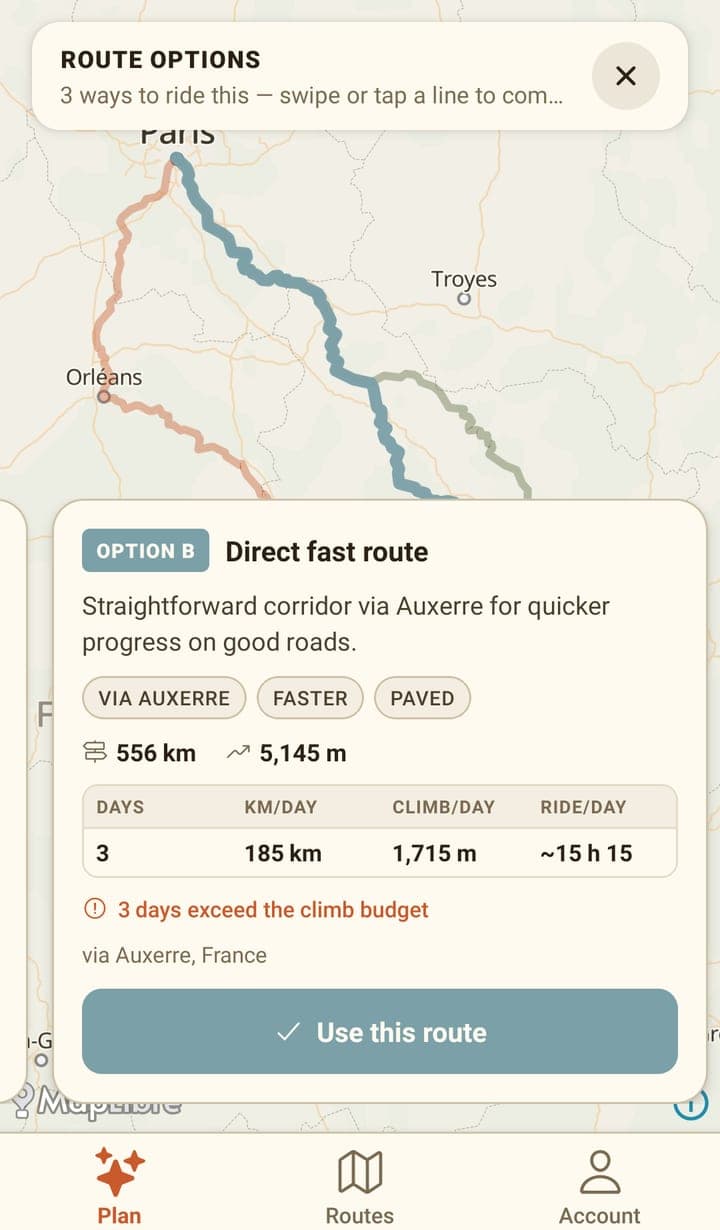
When Mec proposes options, the chat shows a '3 route options' card with View & pick. Each option is drawn on the map in its own colour, and its card carries the distance, the climbing, the per-day breakdown and an honest warning when the days exceed the climbing you said you were happy with. Use this route commits the one you picked and splits it into days. The pick doesn't send a message to Mec and costs no credit: the chat shows a 'Route set — 3 days' line with suggested next steps, such as finding sleep, lunch and water. Tapping one of those suggestions is an ordinary message. Mec learns which option you picked with your next message.
Stops and sleep spots
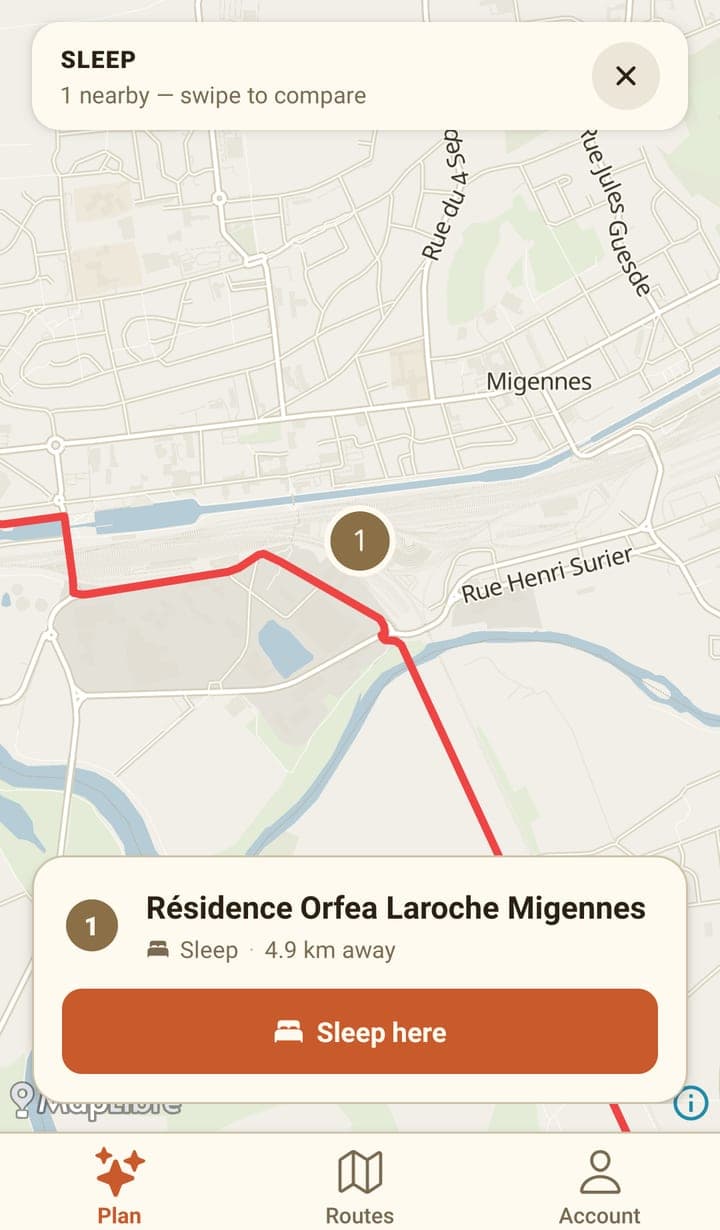
Ask for a bed, water or food and Mec searches around the right point on the route, then shows what it found as pins with a swipeable card for each. Picking one adds it to the route: a sleep spot becomes the end of that day, other stops become a point the route passes through.
Saving
- The band above the chat shows the live route and a Save button — Update once the route is already saved.
- The route is never saved to your account automatically. On a saved route, leaving with unsaved changes asks first and offers Save, Keep editing and Leave; Leave drops those changes.
- Chatting doesn't count as an unsaved change on a saved route. The chat joins the route's history on its own when you're done with it: when you leave the route screen, close the chat, switch chats or put the app in the background. Saving adds it too.
- A route you've never saved, and its chat, are kept on this phone as a draft you can pick up from the Plan tab. When you leave the route screen, the app asks first and says so, offering Save (when there's a route to save), Keep editing (Stay when there's only a chat), Leave, which keeps the draft, and Discard draft, which deletes it. The chat only joins the route, and Your chats, when you save the route.
- Collapsing the chat sheet on a new route keeps the chat; open it again to carry on.
- Asking Mec to save works too, and you can give it a name in the same sentence.
- LIVE means the map underneath is showing exactly what the chat has produced so far.
Chat history on a saved route
A saved route opens with an empty chat. If the route has earlier chats, the empty chat shows a Chat history list instead of the usual hint: one row per chat, with its title and when it was last used (Today, Yesterday or a date). Tap a row to load that conversation's messages and carry on. The text comes back; interactive cards such as route options and place pickers don't.
Once a chat is open on a saved route, a New chat pill sits in the band next to Save or Update. It clears the chat and takes you back to the Chat history list.
When you carry on with an earlier chat, Mec works from a short summary of it, plus the last few exchanges, rather than the whole conversation. You still see every message. Mec doesn't open with a recap of the last chat; to continue one, pick it from the list. Each chat gets a short title written automatically when it joins the route (when you save, or when you finish a chat on a saved route), as long as it has new messages since its last title. The summary is written only when you reopen a chat and send your first message, so that one reply can take a moment longer to start; the title is refreshed at the same time. Neither costs you credit.
Credit
Each message you send to Mec costs credit from your balance, based on how much work the reply takes. Picking an option in the route options picker, tapping a place, saving, and everything else you do by hand are free. If you run out mid-trip, the chat offers a link to your wallet instead of a reply.
Frequently asked questions
Can I edit the route by hand on the phone?
No. Dragging the line, moving points and reordering stops are web-planner features. On the phone you ask Mec, or tap a place in one of its pickers.
Is my route saved automatically?
No. Use the Save button in the band above the chat, or ask Mec to save it. Until then, a route you've never saved is kept on this phone as a draft you can reopen from the Plan tab. Unsaved changes to a saved route aren't kept: leaving asks first and offers to save.
Where do I find an earlier chat about a route?
Open the saved route and tap Ask Mec to tweak: its chats are listed under Chat history. They're also under Your chats on the Plan tab. A chat on a saved route appears there once you finish it or save the route; a chat on a route you never saved doesn't appear there, but stays with the route's draft on the Plan tab.
Why did Mec show me three routes instead of one?
When a trip has more than one sensible line — say a flatter way round versus a shorter way over — Mec draws each on the map with its distance, climbing and per-day figures so you can choose.
Why is Mec taking so long to draw my route?
Every line is computed over real roads and tracks, and a long or off-road route can take 10 to 20 seconds. The status line in the chat changes as the wait goes on, so you can tell it's still working.