The Plan tab
Last verified
This is where you describe the ride you want. Three starter prompts fill the box for you without sending, so you can edit them first. Below that, 'Pick up where you left off' reopens the trip you were last planning: an unsaved trip kept on this phone as a draft, or else your most recently edited saved route. 'Your chats' lists your recent chats with Mec on routes you've saved; tapping one opens that saved route with the chat loaded.
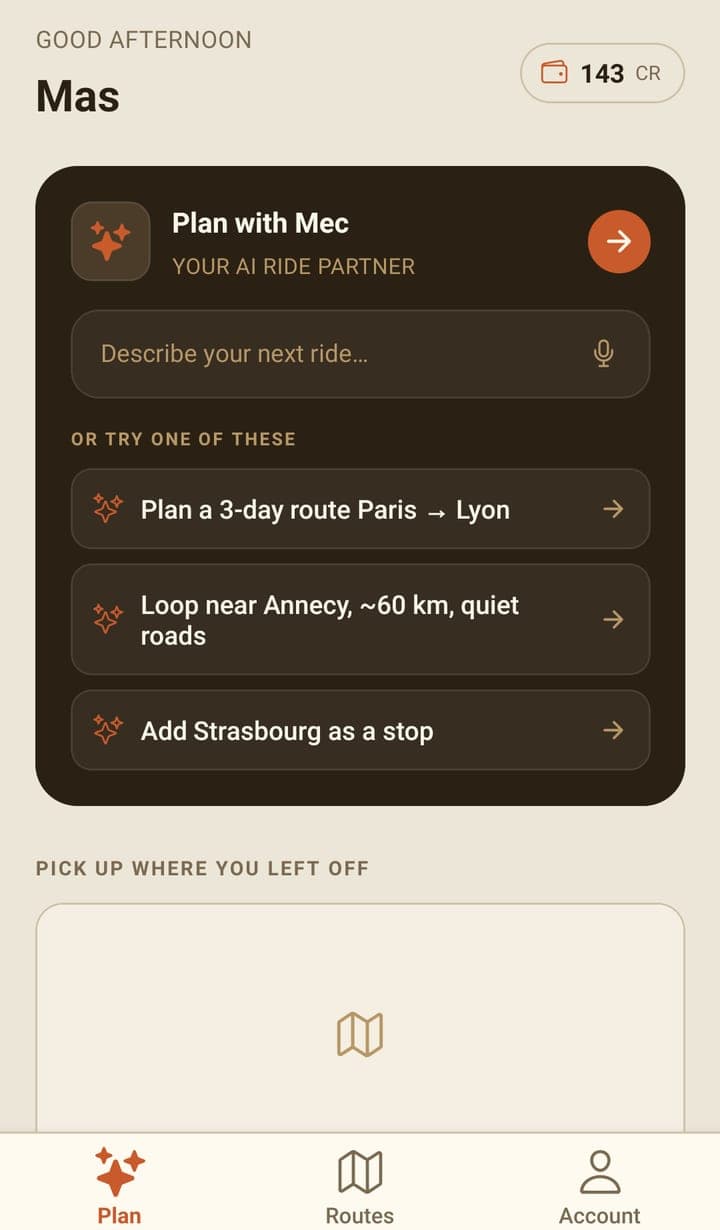
What's on the screen
| Part | What it does |
|---|---|
| The credit pill | Your remaining credit, in whole credits. Tapping it opens your wallet. |
| Plan with Mec | Opens the chat. Tap anywhere on the card, or on the input line. |
| Starter prompts | Fill the message box with an example. They are not sent until you tap send, so you can edit them. |
| Pick up where you left off | Your unsaved trip, as a card marked DRAFT, when this phone has one; otherwise your most recently edited saved route, with its name and bike type. Tap it to carry on. It isn't shown until you have a draft or a saved route. |
| Your chats | Your three most recent chats with Mec on saved routes, with See all when there are more. |
The microphone in the message box is not implemented yet. Type, or tap a starter prompt.
You can plan a whole trip from here. If you're designing one properly rather than sorting out the next few days, the web planner gives you more to work with: drawing the line by hand, importing a GPX you already have, and exporting a file per day.
Unsaved trips and chats
A trip you haven't saved yet is kept on this phone as a draft: the route, if there is one, and your chat with Mec. It survives leaving the route screen, closing the app and restarting the phone, and shows under Pick up where you left off as a card marked DRAFT. Its title is the trip's name, else start → end, else your first message to Mec; underneath it reads the distance ('412.3 km · draft') or, with no route yet, 'Chat with Mec · draft'. Tap it to reopen the trip as you left it and carry on the chat.
The phone holds one draft. It's replaced as soon as you start planning another unsaved trip (once you send a message or a route appears, not merely by opening the chat), and deleted when you save the route or tap Discard draft when leaving the route screen. The draft lives only on this phone: it isn't on your account and doesn't follow you to the web or another device. Save the route to keep it for good.
Your chats only lists chats on saved routes: a chat joins its route when you save the route or, on a route that's already saved, when you finish the chat. They're on your account, so they follow you between devices. Tapping one opens that saved route as it is now, with the chat's messages loaded so you can carry on. The text of the conversation comes back; interactive cards such as route options and place pickers don't.
Both lists refresh every time you come back to the Plan tab. Each chat's title is written automatically when the chat joins its route, refreshed when it has new messages, and again when you pick the chat back up. Titles don't cost credit. To delete one, tap See all and use the bin icon on the row; it asks you to confirm first.
Frequently asked questions
Does tapping a starter prompt cost credit?
No. It only fills the message box. Nothing is spent until you send a message and Mec replies.
Does the app keep a trip I haven't saved?
Yes, as a draft on this phone: the route and your chat with Mec, under Pick up where you left off on the Plan tab, even after the app is closed. There's one draft per phone; starting another trip replaces it, and saving or Discard draft deletes it. Save the route to put it on your account, in the Routes tab and on the web.
Can I talk to Mec instead of typing?
No. The microphone icon in the Plan tab's input line is decorative; there is no voice input in the app yet (coming soon).