Your routes
Last verified
The Routes tab lists every route on your account, newest edit first, with a map thumbnail, region, last edit, distance, days and climbing. Search by name or region, filter by favourites or status, tap the heart to favourite, or swipe left to delete. The list is cached on the phone, so it shows without a signal, but opening a route needs a connection.
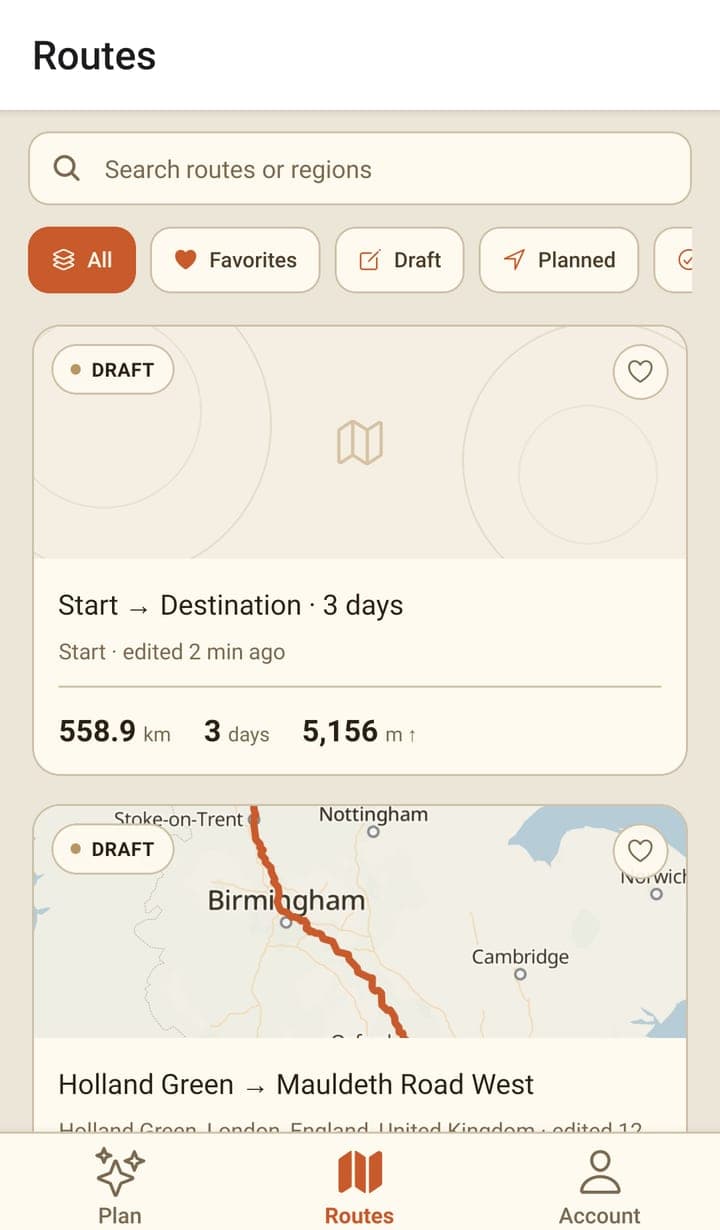
Finding a route
- Search matches the route's name and its region.
- All shows everything; Favorites shows the ones you've hearted.
- Draft, Planned and Completed filter by the route's status, which is set in the web planner.
- Tap the heart on a card to favourite it — it saves straight away.
- Pull the list down to refresh it from your account.
A card carries the status it was given, an E-bike tag where that's set, and the day count once the route has been split. The name comes from the start and end points, plus the number of days, unless you or Mec gave it one.
Deleting
Swipe a card to the left to reveal a red Delete panel, or swipe it all the way across. Either way the app asks you to confirm first, naming the route. Deleting removes it from your account, so it goes from the website too.
What works without a signal
| Offline | |
|---|---|
| Your list of saved routes | Shows from the copy cached on the phone |
| Opening a route | Usually needs a connection — one you had open moments ago may still show |
| The map | Needs a connection — tiles stream as you pan |
| Mec | Needs a connection |
| Downloading a route for a trip | Not built yet |
The app shows an 'Offline' badge on a card that has been downloaded, but nothing writes those downloads yet, so you won't see it. Export the GPX before you set off.
Frequently asked questions
Where do the Draft, Planned and Completed labels come from?
They're the route's status on your account. The app filters by them but doesn't change them — a route's status is set in the web planner's top bar.
I deleted a route by accident. Can I get it back?
No. Deleting is permanent and applies to your whole account, which is why the app asks you to confirm.
Why won't a route open when I'm out of signal?
Only the list is cached. The route itself, and the map it draws on, are fetched when you open it. Offline downloads are listed as coming soon in the Account tab.